
So maybe you’re not really a dummy at all but instead you are a GIS manager who wants and/or needs to understand ESRI versioning. This is one of the most common topics we are asked about in the consulting field and a good one to unpack here in layman’s terms. This is the first in a series of articles that will help to understand versioning as well as provide some useful version management tips and tools.
In ESRI’s simple definition, versioning “is the mechanism that enables concurrent multiuser geodatabase editing in ArcSDE geodatabases.” This is a good place to start. Versioning is one of the true benefits of enterprise GIS because it allows multiple users to be editing the same geographic area and even the same database record at the same point in time. Each user edits the data within their own version in the geodatabase and then ArcSDE provides the tools to merge those edits into the master public version.
The Master Public Version
Before we get too far into the editing details let’s take a look at that master public version. This version is what we refer to as SDE.DEFAULT and every enterprise geodatabase has this version of the data. The default version represents the public view of the data which will include the most up to date edits that have been published for public consumption. When we use the term public we mean that all users of the geodatabase can see this data. It should effectively represent the real-life data at any point in time and is often used as the basis for geo-spatial analysis and or interfacing to other systems that consume the public GIS data.
The definition of versioning can now be refined to be the mechanism that allows multiple users to concurrently edit and publish updates to the public SDE.DEFAULT version. To utilize ESRI versioning you must be using a relational database management system (RDBMS) such as Oracle or SQL Server databases in this series of articles.
In addition to the RDBMS software you must be using the ESRI ArcSDE (Spatial Database Engine) software. ArcSDE enables the RDBMS to capture, manage, and distribute spatial data in a variety of formats.
Setting Up the SDE Repository
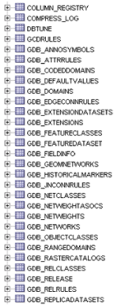
When you first create your enterprise geodatabase you must create the SDE repository within the database. In Oracle the repository is made up of the tables and procedures within the SDE schema. Within SQL Server the repository is made up of the tables and procedures within the SDE database. The repository tables contain information about the GIS business data including the business table names, columns, unique sequences, the spatial data (points, lines, and polygons), geometric networks, and of course – you guessed it – the versions within the geodatabase.
There are also many stored procedures, triggers, and functions which manage the data within the repository. We’ll explore some of these tables and procedures in a future article within this series.
So now you’ve got your SDE repository created and you’ve loaded your GIS business data into the enterprise geodatabase. This alone does not mean you are using versioning with that GIS business data.
Registering Data as Versioned
Registering your GIS business data as versioned is easily accomplished within ArcCatalog via a right click menu option at the dataset or individual stand alone table level. You may have even performed this operation in your own geodatabase – but what is really happening behind the scenes?
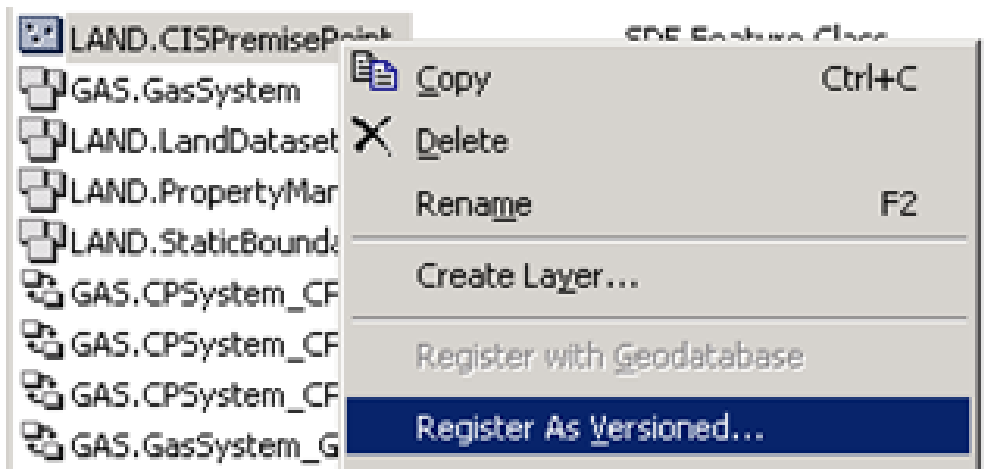
For each business table that you register as versioned, ArcSDE creates two new tables – the ADD table and the DELETE table. We often refer to these tables as the A&D tables or the delta tables because they are used to capture the delta changes to the base business tables.
The A&D tables are created directly in the business schema/database right alongside the base business table. They are easy to find because they are named with the letter A or D followed by a unique numeric ID which represents the SDE repository id for the business table. You won’t see these tables within ArcCatalog but you can see them within your RDBMS tools – for example Oracle SQL Developer or SQL Server Management Studio.
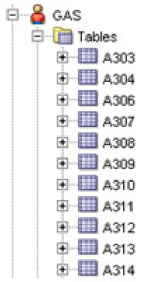
To further explore these data structures it can be helpful to know which business tables correspond to which A&D tables. This information can be attained with a simple query against the SDE repository.
SQL Server
select Registration_ID, Owner, Table_Name from SDE.SDE.SDE_Table_Registry order by Owner, Table_NameThe above queries will return a list of the SDE registration ids for business tables. Combine the registration id with the letter A or D and you now have your versioning tables identified. For example if my PARCEL table has a registration id of 101, the corresponding PARCEL versioning tables are A101 and D101.
The ADD and DELETE Tables Explained
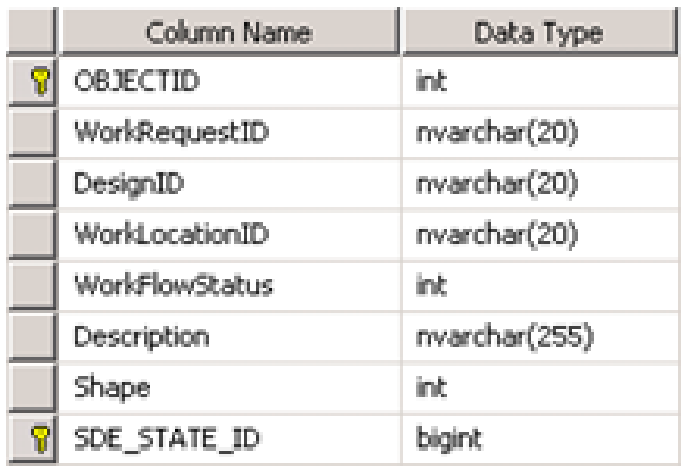
If you now explore the table schema of the ADD table you will see that it contains all of the same columns as the base business table with the addition of an SDE_STATE_ID column. As you have probably guessed by now, the ADD table is used to capture new records that are being ADDED to the business table within a version. The SDE_STATE_ID is used to determine exactly which version it was added in.
On the flip side, the DELETE table is used to capture all business records that are deleted from the geodatabase within a version. If you explore the table schema of the DELETE table you will see that it only contains an SDE_STATE_ID column which is used to determine exactly which version a record was deleted in.
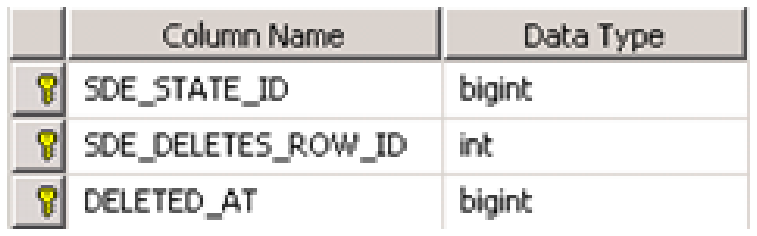
So new records are captured in the ADD table and deleted records are captured in the DELETE table. But what about updates to existing records? An update within the geodatabase can be defined as the replacement of an existing record with new values. And in our versioning tables that means an update will contain both an entry in the DELETE table and a matching entry in the ADD table to represent the replacement of the existing record. These records will share the same value for the unique id (OBJECTID) and the same SDE_STATE_ID which shows that an update took place within the corresponding version.
Wrapping Up
We’ve now covered the very basics of how adds, deletes, and updates are managed within the versioned geodatabase. Each version in the geodatabase is not a copy of the base business tables but is instead simply a mechanism for tracking the delta changes to the base business tables by using the A&D tables as described above. In the next article in this series we will examine how the SDE_STATE_ID values are assigned by ArcSDE and how they can be matched up to specific versions within the geodatabase. We will also provide some useful tools for viewing the A&D edits within the RDBMS.

What do you think?