There are always new ways for utilities to identify the best solutions for getting the most out of their GIS. In this context, it is widely known that many utilities are in the process of modernizing their GIS with the migration of their facility network to Esri’s Utility Network . However, the migration to the UN is no small investment, so utilities are incredibly interested in identifying ways they can take full advantage of this technology, which will ideally result in greater user efficiency and higher overall data quality. It’s important to note that with the Utility Network, there are many ways to solve challenges. Depending on a variety of factors, some solutions may increase user efficiency while others may slow users down and affect overall productivity. There is no better example of this than when it comes to attribute automation, especially as it relates to network connectivity.
One common request we hear during Utility Network implementations, especially for electric networks, is for the automated management of attribute values based on network properties. A few examples of this are Circuit ID (or subnetwork name), phases energized, nominal voltage, and section name. There can be different approaches to solving these requirements, so, each approach should be carefully reviewed to ensure the requirements of the solution align optimally with your GIS data management practices. We’ll discuss ways to solve these requirements, starting with the most obvious and then moving on to “trickier” examples.
Circuit Name
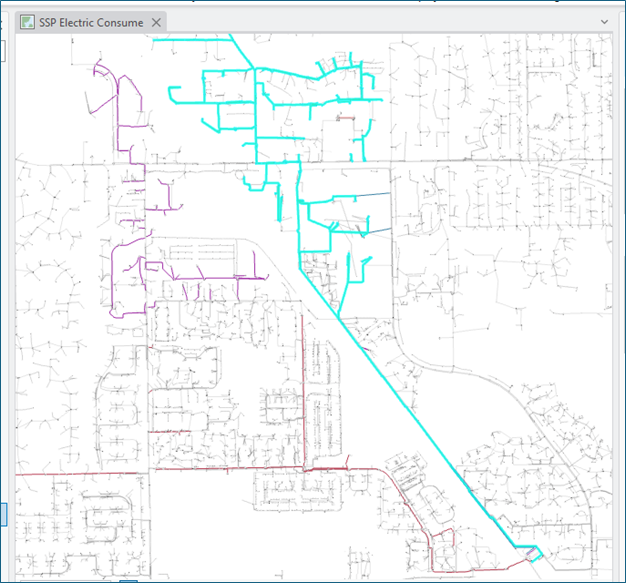
Circuits, of course, are commonly managed in the Utility Network as Subnetworks. When subnetworks are properly configured in your GIS, the Utility Network takes care of the updates to the CircuitID (i.e., Subnetwork Name) on all the GIS features participating in the circuit.
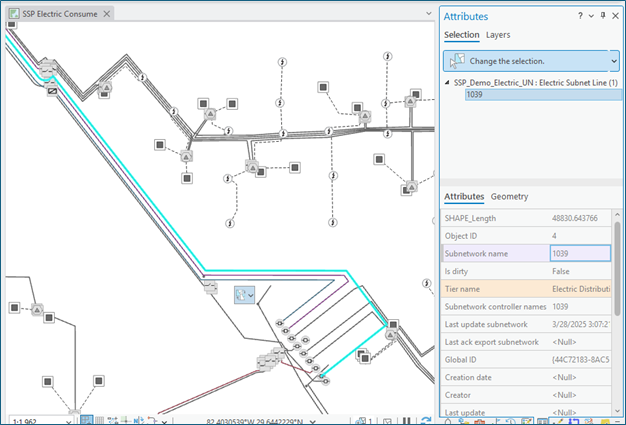
Subnetwork controller features (in this case Circuit Breakers) are established, and when the update subnetwork funtion is run, the process uses the configured subnetwork definition as the trace parameters to define the extent of the circuit. This process uses the trace to get all the features and then updates their ‘subnetwork name’ values (e.g., Circuit ID or Feeder ID). In almost all cases for electric distribution data, leveraging the intended solution of subnetwork management to automate circuit updates on network features is the best and recommended solution.
Phase Propogation
The Utility Network provides “attribute propagation” as a solution to update phase values for features based on their logical proximity to connected features within the network. Similar to Circuit ID (subnetwork name) and when properly configured for propagation, feature updates are initiated when update subnetwork is run and the trace is initiated from the circuit breaker. In short, “ABC” is the starting phase value from the breaker, and as the trace proceeds, it sets the ‘phases energized’ attribute on all downstream assets. The propagation process uses the “Phases Normal” value for features configured to ‘set’ or tap into the phase (on a trunk line, for example), and the ‘bitwise_and’ operator to compare the propagated phase value to the phase value on downstream features.
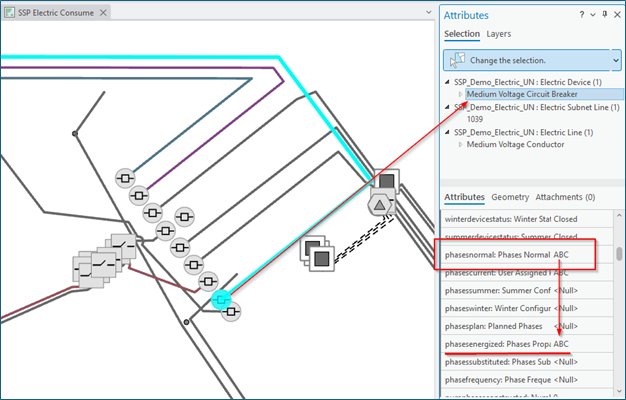
Issues can arise with this approach if there is unique or tribal knowledge with the way phase values are represented in the GIS or inconsistency with how Phases Normal values are set across different network GIS features. An example of this is setting the Phases Normal value on lines in some areas of the network and on devices in other areas. To fully leverage attribute propagation, utilities may need to change the ways they manage data and possibly fix data during the migration process.
When it comes to attribute automation for examples like Nominal Voltage or Section Name, things get a bit muddier.
Nominal Voltage and Section Names
For nominal voltage, attribute propagation can work in “happy path” scenarios but have challenges where the network does not proceed in a traditional radial path, such as step transformers or certain “loop” scenarios. This is because the best out of the box option provided is to configure attribute propagation for Nominal Voltage with the ‘min’ operator. When update subnetwork runs the subnetwork trace, voltage propagation (if configured) is initiated, and voltage values are evaluated in each downstream transformer to determine the minimum of the actively propagated value against the low-side voltage value of the device. In the cases where transformer voltages may vary in a connected loop scenario or may “step up” in the case of a Step Transformer, the propagation will stop or worse, propagate incorrectly.
Section Names are commonly relied on to organize or group connected features in sections of the electric network within a circuit, as a “circuit section.” These groups of connected assets can be used in field operations (switching) and system integrations (maintenance planning and asset management and/or ADMS). Examples of circuit sections include URD (Underground Residential Distribution) loops, sections managed by mid-point switches, or groups of low voltage assets serving homes.
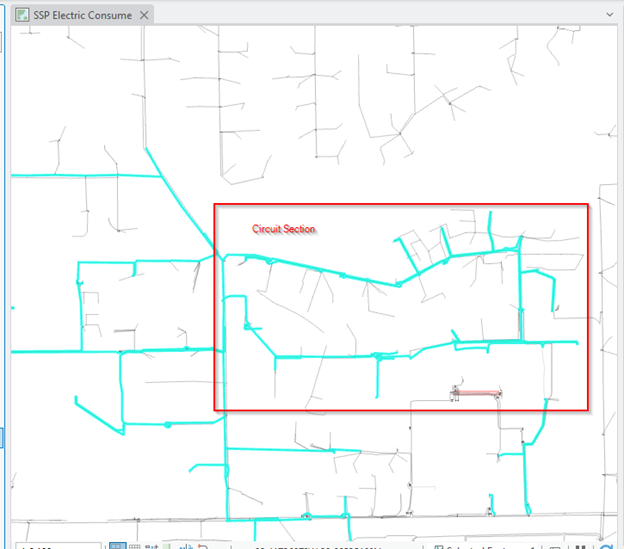
The primary means of automating “name” or “ID” attributes for groups of connected features in the utility network is via subnetwork management. Using utility network subnetworks to manage circuit sections overcomplicates the data management process and adds overhead to subnetwork processing. This is because it places additional burden on GIS editors to also manage the following components for circuit sections: subnetwork controllers, terminals to determine the source direction, and updating subnetworks.
For these “trickier” attribute automations (like nominal voltage and circuit sections), the utility network has the ability to perform traces to select features and then update them from the selection set. We can additionally use “named trace configurations” to consistently trace the network to perform traces that group connected assets into voltage groups or circuit sections. Once a group of assets are selected, it’s easy to “mass update” the desired attributes from the selection set. Furthermore, the Esri Solutions team has released a batch tracing toolset on github that allows for the storage of section starting points. This allows end users to initiate traces from section sources like transformers (in the case of Nominal Voltage management) or open points (in the case of URD circuit sections).
In many of our customers’ utility network implementations, we’ve taken these approaches further and expanded them to fully automate traces and feature updates. We’ve also automated ways to manage section sources, making GIS editors more efficient.
Summary
By carefully evaluating available options and aligning solutions with operational needs, utilities can fully realize the benefits of modern GIS technology. If you have any questions or thoughts you’d like to share, feel free to send them along in the, What Do You Think or Let’s Talk sections below.

What do you think?